Search

Trip Database Blog

Liberating the literature

Month

February 2025

Analysing weblogs to suggest search terms

I just had an interesting discussion with a group of NHS librarians from NHS Wales about Trip and the use of LLMs. Most of the features I highlighted were geared towards health professionals, which made me feel a bit guilty about not focusing more on their needs.

So, at the end of the discussion, I suggested an idea that could benefit a wider audience: using LLMs to analyse past user searches on a given topic and generate related search terms (often a problem for information specialists – identifying additional terms to use in a search). I’ve often thought this could be valuable – essentially harnessing the collective wisdom of our users to improve search experiences.

To test this concept, I took a large list of searches related to urinary tract infections (UTIs) and asked ChatGPT to analyze them. The result? A structured mind map that categorizes searches into key themes, making it easier to explore related topics more effectively:
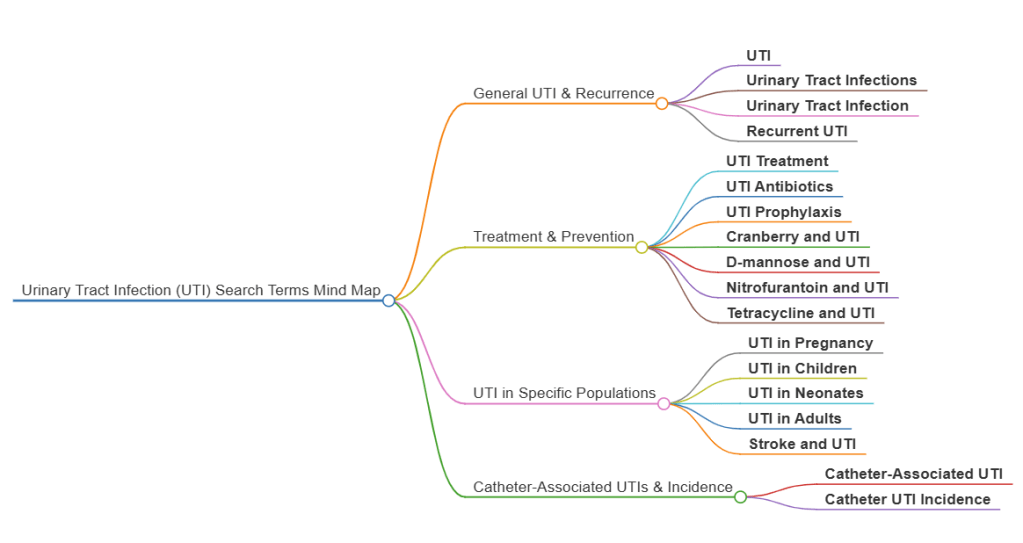
It looks nice, but is it useful?

Small design tweaks

To accommodate the wonderful Mind Maps feature we’ve had to redesign the navigation bar at the top of the results page, which now looks like this:

Clicking on the ‘Display options’ reveals the features that were previously in view:

Hopefully nothing too controversial there…

Mind Maps – a video introduction

Mind Maps now live

We’re really excited to announce the launch of our mind map feature, our second AI product (after ‘Latest evidence’)!

A mind map is – according to ChatGPT: A mind map is a visual tool used to organize information, ideas, or concepts in a structured, non-linear way. It starts with a central idea or topic, from which related ideas branch out in a radial fashion. Each branch can have sub-branches, creating a network of connected thoughts. Mind maps help with brainstorming, problem-solving, studying, and planning by making complex information easier to understand and remember. They typically use keywords, colors, and images to enhance creativity and recall.

Seeing an image will better help understand the concept, but to start you need to understand how to create one! Firstly, do a search and at the top of the results you’ll see this:

Note the Mind Map ‘button’ on the right-hand side. You click on that to generate a mind map based on the top 150 search results. In this example we used a search for prostate cancer:

Not only does this give a great topic overview it can support search as each branch and sub-branch is clickable to generate a new search.

Enjoy!

Blog at WordPress.com.

Up ↑