Search

Trip Database Blog

Liberating the literature

Month

November 2025

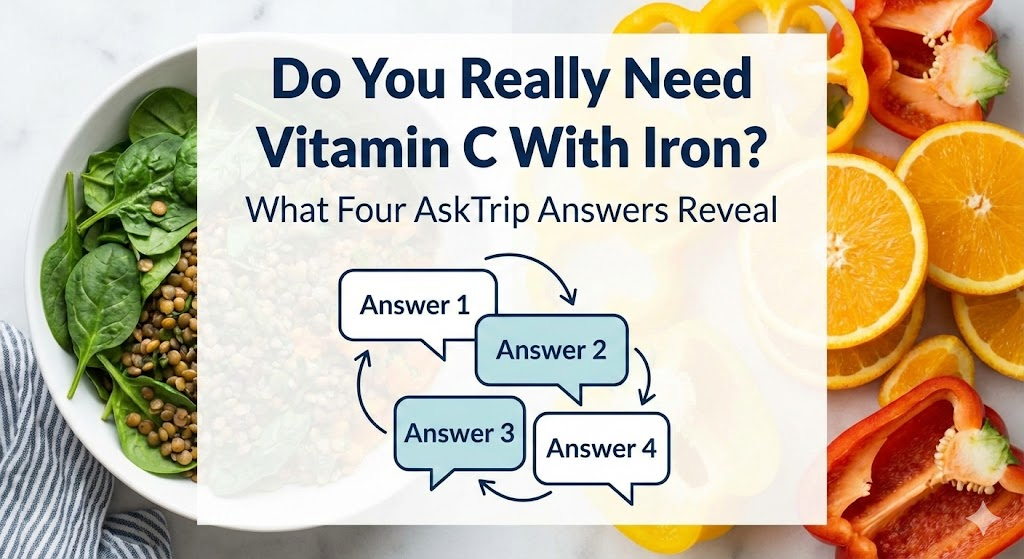
Do You Really Need Vitamin C With Iron? What Four AskTrip Answers Reveal

At AskTrip, we often see clusters of very similar or overlapping clinical questions submitted by users. When this happens, we like to review the answers side-by-side to check for consistency and to understand how our system handles closely related prompts. Recently, we noticed several questions about whether vitamin C should be taken with oral iron, so we ran them together to compare the outputs. While the core clinical message across the answers is the same, the emphasis and level of detail vary in interesting ways.

Q1. How much vitamin C is required to enhance oral iron absorption?

Clinical Bottom Line:
Vitamin C can enhance iron absorption, with suggested doses ranging from 100 mg to 500 mg. However, evidence on its additional benefit with iron supplements varies, indicating further individual assessment may be needed for supplementation decisions.


Q2. What are the recommended best practices for oral iron supplementation in patients with anemia, considering the addition of vitamin C?

Clinical Bottom Line:
While vitamin C is often suggested to enhance the absorption of oral iron, current evidence does not conclusively support its clinical benefit in treating iron deficiency anemia. More research is needed to establish definitive guidelines.


Q3. Does vitamin C help with iron absorption?

Clinical Bottom Line:
Vitamin C enhances the absorption of non-heme iron, but its impact on clinical outcomes in anemia treatment alongside iron supplements is inconclusive based on current evidence.


Q4. What is the effect of ascorbic acid on iron absorption in patients with iron deficiency anemia?

Clinical Bottom Line:
The evidence suggests that ascorbic acid does not significantly enhance the effectiveness of iron supplements in improving hemoglobin or ferritin levels in patients with iron deficiency anemia. Further research is needed to clarify its role.


So, Do These Answers Say the Same Thing?

In practical terms, yes. All four answers point toward the same actionable advice for clinicians:

  • Vitamin C does enhance iron absorption biochemically.
  • But clinical trials have not shown meaningful improvements in hemoglobin or ferritin when vitamin C is added to oral iron therapy.
  • Therefore, adding vitamin C is optional, not essential.
  • It may still be useful in people with low dietary vitamin C intake or when iron is taken with food, but it is not required for most patients.

Where the answers differ is in emphasis. Some focus more on the theoretical mechanism, others on dosage, and others on clinical outcomes.


Why Do the Answers Differ?

Although all four answers communicate the same core clinical message, the differences in tone, emphasis, and detail reflect the non-deterministic nature of large language models (LLMs). These models don’t retrieve fixed responses; instead, they generate answers dynamically by predicting plausible language patterns based on their training data and the prompt. As a result, even when the underlying evidence is the same, each answer may frame the issue slightly differently, highlighting certain studies, focusing more on mechanisms or clinical outcomes, or varying in how strongly the conclusions are stated. This variability is normal for LLMs and explains why answers can align on substance while differing in style or emphasis.

Final Thoughts

This small experiment highlights both the strengths and quirks of AI-generated clinical answers. Even when content is broadly aligned, the framing can shift subtly, which matters if you’re a clinician looking for crisp guidance. The good news is that, in this case, the core message across all four answers is consistent and clear: iron works on its own, and vitamin C is optional.

UPDATE

Not long after posting we were contacted by a user asking about reference overlap, an excellent question! I asked ChatGPT to analyse the overlap (it feels less biased than me doing it): “Across the four Qs, there is a strong shared core of evidence—mainly one major RCT and one or two meta-analyses—plus a recurring guideline. Around this core are unique additions tailored to each question’s angle (mechanistic vs. clinical).

I’m fairly reassured by this extra analysis!
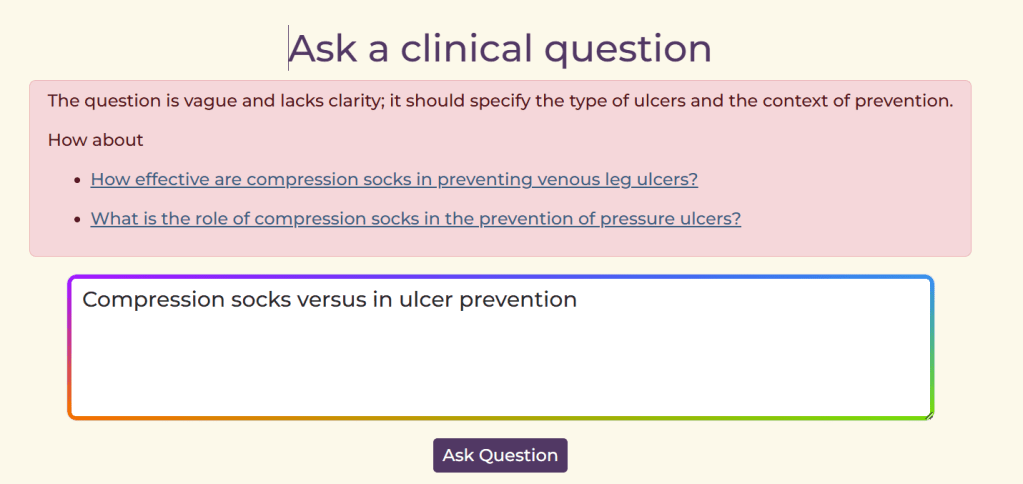
From Rejection to Guidance: How AskTrip Now Helps Users Fix Their Questions

At AskTrip, our goal is to help users get reliable answers to their clinical questions. We identified a recurring issue: occasionally, the system must reject a question, often because it contains patient-identifiable information, is too vague, or isn’t really a clinical query. Until now, users simply received an unhelpful message saying the question had been rejected, offering little guidance on what to do next.

We’ve now rolled out an improvement that changes this. Instead of a dead end, users receive clear, constructive feedback along with tailored alternative questions they can select with a single click, immediately starting the question-answering process. This turns a rejection into a smooth path toward getting the clinical information they need.

For example:

It’s a small change with a big impact: fewer dead ends, clearer questions, and faster access to trusted clinical answers.

HTML Scissors

When I first started in clinical Q&A nearly 30 years ago with ATTRACT, we often received questions from general practitioners that I knew could be answered by the excellent clinical guidelines available at the time (I think they were called Prodigy then). The challenge wasn’t the lack of guidance – it was that the guidelines were long, and pinpointing the relevant section was difficult. For many questions, our real task was simply to extract the key information buried within a mass of content, most of which wasn’t directly relevant.

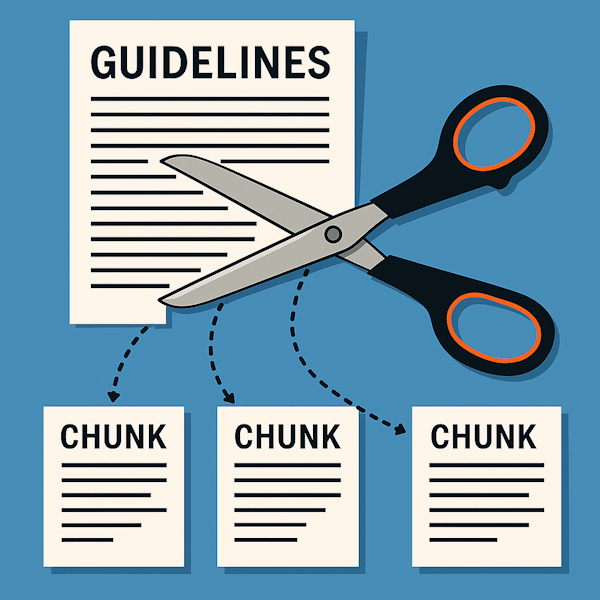
Even then, I felt that if the guidelines were broken into bite-sized pieces, they would be far easier to use. I used to talk about taking a pair of “HTML scissors” to cut them up, so GPs could more easily find the specific information they needed for themselves.

Fast forward to today, and at AskTrip we face a related challenge – one that has reminded me of those early “HTML scissors” conversations. Our system searches documents and sends the entire text (guidelines, systematic reviews, and so on) to the AI model, asking it to identify and extract the relevant passage. If a document happens to be 5,000 words long, this process takes time – and incurs unnecessary computational cost – just to locate the key section.

By coincidence, the idea behind those old “HTML scissors” has become a recognised approach in modern information retrieval. It’s now a standard technique, widely used in AI pipelines, and it even has a name: chunking.

Chunking divides large documents into smaller, coherent sections to make them easier and faster to process. Instead of treating a guideline as a single 5,000-word block, chunking breaks it into major thematic units – such as causes, diagnosis, initial management, monitoring, or special populations. Within each of these larger chunks, the content can be divided even further into sub-chunks, which capture more granular pieces of information. For example, a diagnosis chunk might be split into sub-chunks for individual diagnostic tests, criteria, red flags, and decision pathways. These sub-chunks retain enough local context to stand alone, allowing the AI system to pinpoint very specific information without processing the entire guideline or even the full section.

The result is faster retrieval, lower computational cost, and more accurate matching between a clinician’s question and the part of the guideline that truly answers it. Because the AI is working with smaller, well-defined blocks of text, it can zero in on precise details – such as a dosing adjustment, a diagnostic threshold, or a management step – without being distracted by the surrounding material. This not only reduces latency and improves user experience but also increases reliability: the system is less likely to miss key details or return irrelevant passages, making the overall process both more efficient and more clinically useful.

So, our next major improvement to AskTrip is the introduction of chunking for large documents. This will allow us to deliver clearer, more precise answers, generated more quickly and at a much lower computational cost. And we’re not stopping there. To push performance even further, we’re developing vector search to improve how we target the most relevant chunks in the first place. I’ve written a brief explanation of vector search already, and I’ll share more updates as this work progresses—but together, these advances mark a significant step forward in making AskTrip faster, smarter, and more efficient for everyone who relies on it.

New on Trip: Linking RCTs to Trial Registrations and Systematic Reviews

Released today: We’ve added a new feature to Trip that helps you understand clinical trials in their full context. When you view an RCT, Trip now automatically attempts to links to:

  • its ClinicalTrials.gov registration, and
  • any systematic reviews that include the study.

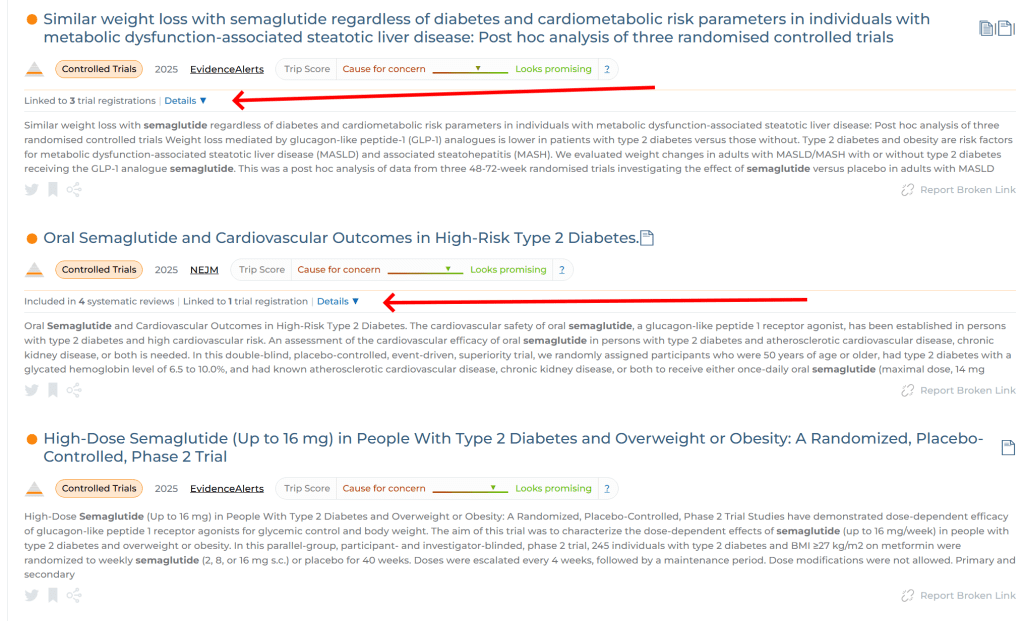
This makes it easier to verify protocols, spot outcome discrepancies, and see how a trial fits into the wider evidence base – all without extra searching. This is how it looks:

In the top RCT we can see it links to 3 trial registrations. The second RCT links to 1 trial registration and is linked to 4 systematic reviews. And, finally, for the 3rd RCT we have not been able to find a trial registration or an inclusion in a systematic review. NOTE: Just because we can’t find a trial registration it doesn’t mean it’s not been registered, it simply means we have been able to identify it using the scraping technology we’ve employed.

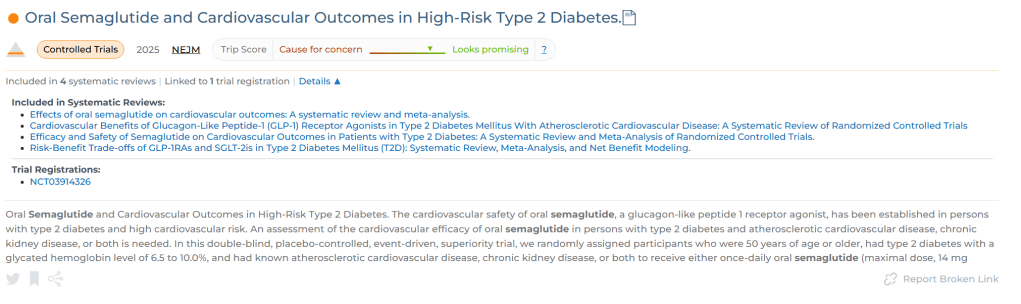
If you click on the ‘Details’ link a drop-down appears:

This is really cool and it’s part of our ongoing effort to make high-quality evidence quicker and easier to use.

What Is Vector Search?

Vector search is becoming increasingly prominent. At Trip we’re exploring its use and – in the spirit of transparency – we wish to share insights into what it is and how it differs from keyword/lexical search! And, to be clear, we’re at the start of the journey…!

From Keywords to Concepts: How Vector Search Is Changing Information Retrieval

For decades, information retrieval has been built on keyword search — matching the words in a user’s query to the same words in documents. It’s the logic behind databases, search engines, and Boolean queries, and it has served information specialists well, particularly when controlled vocabularies like MeSH are used.

But language is slippery. Two people can describe the same idea in very different ways — “heart attack” vs. “myocardial infarction,” “blood sugar” vs. “glucose.” Keyword search struggles when users and authors use different terms for the same concept.

That’s where vector search comes in — a new approach that focuses on meaning rather than exact wording.

What Is Vector Search? (An Intuitive Explanation)

At its core, vector search represents meaning mathematically.
Instead of treating text as a bag of words, it converts language into numbers that capture relationships between concepts.

This transformation happens in three main steps.


1. Text to Vectors — Turning Language into Numbers

The starting point is a language model — a type of AI system trained on vast amounts of text (for example, research papers, books, and web content). During training, the model learns how words appear together and in what contexts. Over time, it builds a kind of map of language, where meanings cluster naturally.

Here’s how this works in practice:

  • Words that often appear in similar contexts, such as doctor and physician, end up close together in this semantic map.
  • Words that rarely co-occur or belong to very different contexts, like insulin and wheelchair, are far apart.

When text is processed by the model, each sentence or paragraph is represented as a vector — a list of numbers indicating its position in this high-dimensional space.
For instance:

  • “High blood pressure” → [0.13, -0.45, 0.77, …]
  • “Hypertension” → [0.12, -0.47, 0.75, …]

These numbers are coordinates on hundreds of “meaning axes” that the model has learned automatically. While humans can’t easily interpret each axis, together they capture how phrases relate semantically to everything else in the model’s training data.

You can think of these dimensions as encoding things like:

  • Whether the phrase is medical or general
  • Whether it describes a disease, treatment, or symptom
  • Its relationships to concepts such as “cardiovascular” or “chronic condition”

If two texts have vectors that are close together, it means the model recognises that they have similar meanings.

So:

  • “High blood pressure” and “hypertension” → almost identical
  • “High blood pressure” and “low blood pressure” → related but opposites
  • “High blood pressure” and “migraine” → far apart

This process — called embedding — is how modern AI systems move from words to concepts.


2. Measuring Similarity

When a user searches, their query is also converted into a vector. The system then compares that query vector to every document (or passage) vector in its database using a measure of semantic closeness, often called cosine similarity.

The closer two vectors are, the more related their meanings. This allows vector search to identify results that discuss the same idea even when the words are completely different.

For example, a query about “lowering blood pressure without medication” might retrieve:

  • Trials on “lifestyle modification for hypertension”
  • Reviews of “dietary sodium reduction”
  • Cohort studies on “exercise and cardiovascular risk”

— even if the exact phrase “lowering blood pressure without medication” doesn’t appear in any of those documents.


3. Returning Results

Instead of relying on literal matches, vector search retrieves the documents (or parts of documents) closest in meaning to the user’s query.

In contrast:

  • Keyword search finds what you said.
  • Vector search finds what you meant.

How It Differs from Keyword Search

FeatureKeyword SearchVector Search
BasisExact word matchingConceptual similarity
StrengthsTransparent, precise, good for controlled vocabulariesFinds semantically related content, handles synonyms and context
WeaknessesMisses relevant material with different wordingMay surface loosely related material if not tuned carefully
Good forNarrow, well-defined, reproducible queriesExploratory or question-based searching

Many systems now use hybrid search, combining keyword and vector methods. Keywords help with precision and reproducibility; vectors help with recall and conceptual understanding.


Why It Matters for Information Specialists

For information professionals, vector search introduces both power and complexity.
It enables:

  • Retrieval of semantically related evidence, even when vocabulary differs.
  • More natural-language searching — closer to how users think and ask questions.
  • The foundation for AI-driven Q&A tools, where the system retrieves and synthesises the most relevant evidence rather than just listing papers.

But it also brings new challenges:

  • Relevance can be fuzzier and harder to explain.
  • Transparency and reproducibility — essential in evidence-based work — need careful handling.
  • Understanding how a system defines “similarity” becomes as crucial as knowing how it handles Boolean logic or MeSH terms.

The Bottom Line

Vector search doesn’t replace traditional methods — it expands them.
It’s a bridge between human language and machine understanding.

In short:

Keyword search finds the words. Vector search finds the meaning.

Together, they represent the next chapter in evidence discovery and retrieval — one that blends linguistic nuance, AI, and the information specialist’s craft.

Further improvements to AskTrip

We have just rolled out a batch of improvements to AskTrip, with three main changes:

  • Medicines information
  • Answer consistency
  • Improving the efficiency of Beyond Trip

Medicines Information

Previously answers about medicines (e.g. side effects, dose etc) relied on the reports in the research literature. This was fine, to a point, but we realised dedicated information was required. So, now, if we receive a question about medicines we include the relevant content from the DailyMed and openFDA. Both are great medicine resources.

Answer consistency

AI can be a bit inconsistent at times (it’s described as being non-deterministic) and this can manifest itself by giving slightly different answers and using different references for the same or very similar questions. Typically, these differences are small – often just nuances – but they can still feel a bit unsettling! So, we’ve introduced something we call reference stripping. In essence, when we receive a question that’s very similar to a previous Q&A, we ensure the new answer takes the earlier references into account, boosting consistency across responses.

Improving the efficiency of Beyond Trip

Beyond Trip was proving quite expensive to run, so we needed to find ways to reduce costs. Previously, the system reviewed all of the top search results we found. But we soon realised that “top” didn’t always mean relevant. Many results near the top of the list weren’t particularly useful for the actual query.

To fix this, we introduced an extra step to exclude results that are likely to be irrelevant. The remaining results are then reviewed sequentially until we’ve gathered enough evidence for a solid answer. This approach reduces costs and brings a small but welcome speed boost.

Blog at WordPress.com.

Up ↑