What follows is a summary of a longer paper on some of the problems that the Cochrane Collaboration face. It is based on the presentation I gave at Evidence Live 2013 entitled ‘Anarchism, Punk and EBM’.
But to begin with I want to make it clear that I am fully supportive of systematic reviews and the reasons for doing them. I also want to make it clear that this is not a criticism of the many thousands of volunteers who give their time freely to improve global healthcare. I am in awe of their efforts. My criticism is based on the fact that I feel that the current methods are unsustainable.
Relevancy to clinical practice.
I have run a number of clinical question answering and between them have answered over 10,000 clinical questions. It is very rare for a single systematic review to answer a question. In an analysis of 358 dermatology questions only three could be answered by a single systematic review, so less than 1%. Although we have only formally analysed dermatology there is little sense that many other areas do noticeably better, but there are some e.g. respiratory (but that would still answer fewer than 5% of the respiratory questions. In answering clinical questions I wish we had more systematic reviews that were useful for my work. Should systematic reviews answer real questions?
Methodology
On average a Cochrane systematic review takes 23 months from protocol to publication [1] and hundreds if not thousands of hours [2]. This causes problems with both production and subsequent updating of reviews. Clearly, with a finite resource the longer a systematic review takes to produce the fewer you can do.
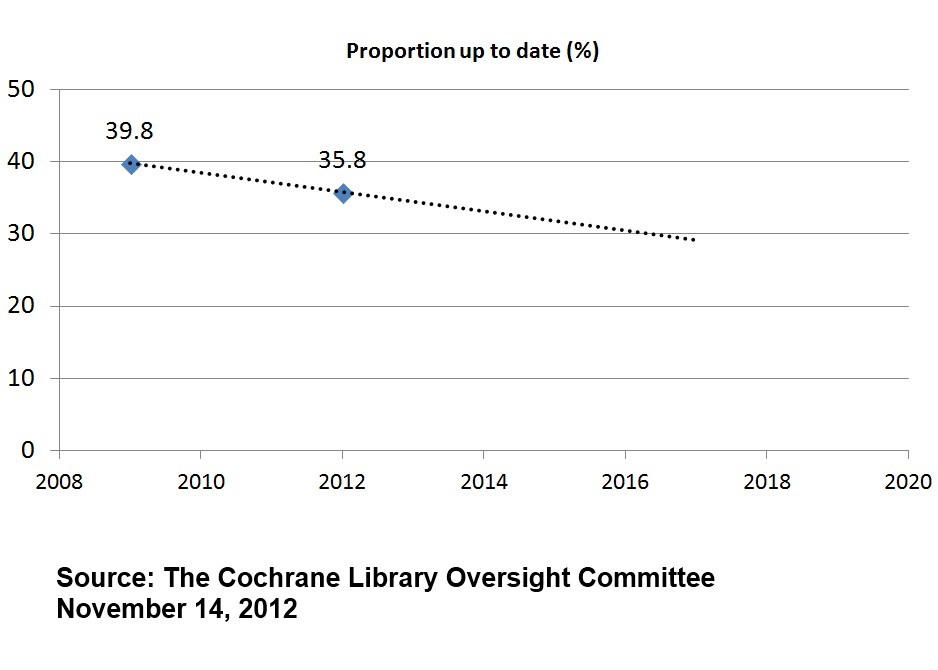
In 2009 only 39.8% of their systematic reviews were up to date (using Cochrane’s own definition of being updated within the past two years) while by 2012 it had dropped further to 35.8% [1]
These figures are slightly mis-leading as the number of systematic reviews has increased in that time. In 2009 there were 3,958 active reviews and in 2012 that figure had risen to 4,905. So, in 2009, of the 3,958 reviews, only 1,575 were up to date. In 2012, of the 4,905 reviews, only 1,756 were up to date – an increase in up to date reviews of just 181 in three years. Putting this another way, in 2009 there were 2,383 out of date systematic reviews and in 2012 this had risen to 3,149.
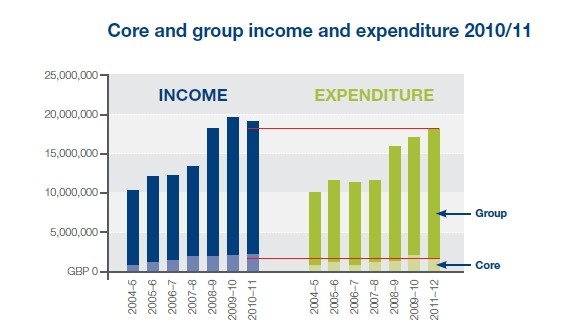
These figures are terrible and are made worse by the relatively recent increase in funding and spending Cochrane has enjoyed [3].

In the last seven years of financial figures the Cochrane Collaboration has spent in excess of £100 million and over the twenty years it has existed this is likely to be over £150 million – over a quarter of a billion US Dollars. It is probably redundant to point out that this is a vast sum. [UPDATE: it has been pointed out that £150 million is actually not that much and could be seen as a pittance – I guess it depends on perspective].
As well as significant financial support Cochrane has the selfless support of 28,000 volunteers. Yet, the number of active systematic reviews is still modest. This indicates that the current system is unsustainable and not fit for purpose. The methodology, while reducing some bias, has resulted in a huge cost increase, not just financial but also opportunity cost. Ironically, the case of Tamiflu highlights that the methodology is flawed.
Tamiflu
I do not wish to repeat the Tamiflu story here, for those interested there are numerous opportunities to find out more [4, 5]. In the latter reference, Tom Jefferson states:
“…I personally believe and my colleagues believe with me that Cochrane Reviews based on publications should really be a thing of the past…”
This is based on the fact that, when preparing the first Cochrane systematic review on neuraminidase inhibitors for preventing and treating influenza in healthy adults and children Tom and his team only relied on published journal articles [6]. This was subsequently found to miss large amounts of data, most of which was made available for the regulatory agencies e.g. EMA, FDA. The updated, 2012, review [7] was a huge undertaking, even by Cochrane standards, but it was the only way Tom and his team felt they could obtain accurate estimations of the effect of neuraminidase inhibitors.
But Tom is not alone in concerns about methodology, concerns with relying on aggregated trial data were made by Jack Cuzick, at Evidence Live 2013. He made a general call for reviews to be based on individual patient data (IPD).
Both Tom and Jack feel that the current Cochrane methodology is not capable of making an accurate assessment of an interventions ‘worth’, albeit for different reasons. The seriousness of this challenge should not be underestimated, it attacks at the very heart of the Cochrane Collaboration.
Is there any hope?
In recent years there have been a number of articles that have suggested, to differing degrees, that doing things more quickly can give you the same or similar results to the Cochrane methodology. I will highlight three:
1) Can we rely on the best trial? A comparison of individual trials and systematic reviews [8]. In this paper the authors (including me) explored a random sample of Cochrane systematic reviews to see how often the largest randomised trial was in agreement with the subsequent meta-analysis. This occurred in 81% of the meta-analyses examined and if the largest RCT was positive and significant it was around 95%. In other words, using the largest RCT can give a broad hint as to the likely result of a subsequent meta-analysis.
2) McMaster Premium LiteratUre Service (PLUS) performed well for identifying new studies for updated Cochrane reviews [9]. In this study the authors compared the performance of McMaster Premium LiteratUre Service (PLUS) and Clinical Queries (CQs) to that of the Cochrane Controlled Trials Register, MEDLINE, and EMBASE for locating studies added during an update of reviews. They concluded that PLUS included less than a quarter of the new studies in Cochrane updates, but most reviews appeared unaffected by the omission of these studies. In other words, you do not necessarily need to get all articles to arrive at an accurate effect size (compared to the Cochrane systematic review).
3) A pragmatic strategy for the review of clinical evidence [10]. In this paper the authors compared a research strategy based on the review of a selected number of core journals, with that derived by an SR in estimating the efficacy of treatments. The authors concluded “We verified in a sample of SRs that the conclusion of a research strategy based on a pre-defined set of general and specialist medical journals is able to replicate almost all the clinical recommendations of a formal SR.”. Essentially, the same message as 2) above.
The future
It is a very easy concept, the greater the cost (finance, time etc) of a systematic review the fewer systematic reviews within a fixed budget can be undertaken and kept updated. Therefore, a major focus for Cochrane should be on reducing the cost per review. Cochrane is full of incredibly talented people who appear to focus predominantly on reducing bias and random error. This, to me, is a clear example of the laws of diminishing returns. I would set the major challenge, for the next five years of Cochrane, to be – how to do a systematic review in a month (or less).
This side-steps the issue of regulatory data and/or IPD!
I see a future for Cochrane as having two types of systematic review: rapid systematic reviews undertaken in a significantly reduced timeframe, and a more costly systematic review that includes regulatory data and/or IPD. If Cochrane can reduce the cost of a systematic review to around 10% of what it is now it means they can do ten times as many. Or Cochrane might choose to do fewer than ten times as many rapid systematic reviews and leave any remaining resource to do the more costly systematic reviews. The issues becomes (i) when can Cochrane ‘get away’ with a low-cost systematic review and (ii) when a high-cost review warranted. These are questions requiring a research base to answer the questions, as well as being a question of values.
The argument has been made to me that there is a negative cost of doing a low-cost systematic review that might generate the ‘wrong’ answer. While I appreciate this could be a scenario I would reply that while you’re busy doing one systematic review ‘correctly’ you are neglecting 5-10 rapid systematic reviews that might generate significantly higher benefits. But, the lack of an evidence base is hampering our ability to address these questions. This favours the status quo, which could actually be doing more harm than good.
Finally, I can’t help feeling the current direction of travel by Cochrane is taking us down a conceptual cul-de-sac [11]:
“Researchers in dominant paradigms tend to be very keen on procedure. They set up committees to define and police the rules of their paradigm, awarding grants and accolades to those who follow those rules. This entirely circular exercise works very well just after the establishment of a new paradigm, since building systematically on what has gone before is an efficient and effective route to scientific progress. But once new discoveries have stretched the paradigm to its limits, these same rules and procedures become counterproductive and constraining. That’s what I mean by conceptual cul-de-sacs.”
Bottom line: Systematic reviews are vitally important in practicing evidence-based healthcare. Given that there is a finite funding ‘envelope’ it is imperative to maximise the number of systematic reviews that can be undertaken and to maximise relevancy to clinical practice. This means significantly reducing the cost per review and improving the prioritisation process.
NOTE (04/09/2015): Since writing this article I have written a number of follow-up articles:
References
- The Cochrane Oversight Committee. Measuring the performance of The Cochrane Library. 2012
- Allen IE, Olkin I. Estimating time to conduct a meta-analysis from number of citations retrieved. JAMA. 1999 Aug 18;282(7):634-5.
- Cochrane Collaboration Annual Report & Financial Statements 2010/11
- Payne D. Tamiflu: the battle for secret drug data. BMJ 2012;345:e7303
- HAI Europe – Dr. Tom Jefferson on lack of access to Tamiflu clinical trials
- Jefferson TO, Demicheli V, Di Pietrantonj C, Jones M, Rivetti D. Neuraminidase inhibitors for preventing and treating influenza in healthy adults. Cochrane Database Syst Rev. 2006 Jul 19;(3):CD001265
- Jefferson T, Jones MA, Doshi P, Del Mar CB, Heneghan CJ, Hama R, Thompson MJ. Neuraminidase inhibitors for preventing and treating influenza in healthy adults and children. Cochrane Database Syst Rev. 2012 Jan 18;1:CD008965. doi: 10.1002/14651858.CD008965.pub3
- Glasziou PP, Shepperd S, Brassey J. Can we rely on the best trial? A comparison of individual trials and systematic reviews. BMC Med Res Methodol. 2010 Mar 18;10:23. doi: 10.1186/1471-2288-10-23
- Hemens BJ, Haynes RB. McMaster Premium LiteratUre Service (PLUS) performed well for identifying new studies for updated Cochrane reviews. J Clin Epidemiol. 2012 Jan;65(1):62-72.e1
- Sagliocca L, De Masi S, Ferrigno L, Mele A, Traversa G. A pragmatic strategy for the review of clinical evidence. J Eval Clin Pract. 2013 Jan 15. doi: 10.1111/jep.1202
- Greenhalgh T. Why do we always end up here? Evidence-based medicine’s conceptual cul-de-sacs and some off-road alternative routes. J Prim Health Care. 2012 Jun 1;4(2):92-7.J Prim Health Care. 2012 Jun 1;4(2):92-7.





Recent Comments