This morning we hit 7,000 registered users.
We launched the TRIP initiative to highlight content suitable for low-resource settings less than 3 weeks ago (click here).
I’m pleased to see that already 96 articles have been approved (clicked on twice!) to form a small sub-set of articles, this includes 20 systematic reviews and 6 guidelines. A sample of document is shown below.
- Guidelines for the prevention of Malaria in South Africa. South African Department of Health
- Intrarectal quinine versus intravenous or intramuscular quinine for treating Plasmodium falciparum malaria. Cochrane Database of Systematic Reviews
- Cost-effectiveness analysis of antiretroviral drug treatment and HIV-1 vaccination in Thailand. NHS Economic Evaluation Database
- Efficacy of iron-fortified whole maize flour on iron status of schoolchildren in Kenya: a randomised controlled trial. Lancet
- The use of misoprostol in obstetrics and gynaecology. BJOG
- Cost effectiveness of high-risk HPV DNA testing for cervical cancer screening in South Africa. Gynecologic Oncology
You never know when you launch an initiative if it’ll suceed. It’s far too early to say if our ‘low resource’ initiative will – but we couldn’t really have expected a better start.
I came across a free screencast site called Jing which allows to make screencasts/videos.
I’ve been looking out for this sort of software for a while, so I was keen to give it a go and here is my first attempt.
I’d love to hear feedback!
There’s a wikipedia article on the TRIP Database (click here).
If you’re involved in wikipedia – help improve it.
We’ve gone and set up a Facebook page for TRIP, click here to visit – and become a ‘fan’!
It’s still not clear the advantage of being on Facebook, but it is another medium to connect with people, which is probably reason enough. But, if people are more aware of the potential for TRIP on Facebook – please let us know.
Other Facebook pages include:
TRIP is interested in ensuring clinicians have easy access to the best available evidence. That’s why we’re thrilled to see TRIP available to the users of OSCAR Canada. As the wikipedia article states:
“OSCAR McMaster is a web-based electronic medical record (EMR) system initially developed for academic primary care clinics. It has grown into a comprehensive EMR and billing system used by many doctor’s offices and private medical clinics in Canada and other parts of the world. The name is derived from where it was created and an acronym; OSCAR stands for Open Source Clinical Application and Resource and McMaster refers to McMaster University, where it was developed. It enables the delivery of evidence resources at the point of care.”
I”m particularly thrilled to be on OSCAR as it’s an open source project.
Below are some screenshots (click to make bigger) from the first round of integration, a few flaws to be ironed out, but nothing major.
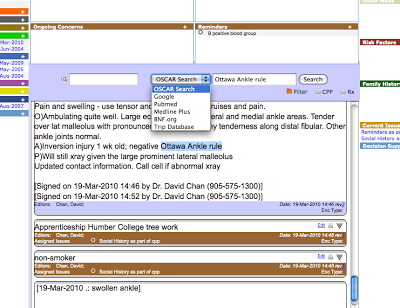
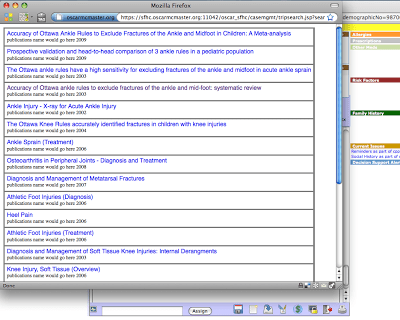
It’s not our first time on an electronic medical record (or sometimes called an electronic health record) – see our October 2009 post TRIP and Electronic Health Records (EHR). I love this integration with ‘point of care’, bringing the evidence closer to where care is delivered.
We’re very pleased to announce the launch of the above initiative, generously supported by the BUPA Giving scheme.
We’ve blogged about the above initiative for a while (click here or here). The basic problem being that users in resource poor settings (for example, a rural district hospital in Africa or South Asia) frequently do not have access to the latest health care technologies e.g. the latest diagnostic bit of kit or expensive new medicine. However, much of the evidence is directed at the newer, more expensive, interventions. So, users from these settings have to overcome the additional problem that much of the evidence is not relevant.
As of today under each link on the results page will have a link ‘Developing World?’ If a registered user of TRIP believes the article is appropriate (see definition below) for such setting we encourage them to click on the link. If two separate people click on the link the article is then deemed suitable; these articles will form a sub-set of data in TRIP. Users of TRIP will then be able to search TRIP and then (via a tick box at the bottom of the ‘Filter your search’ box) be able to select only those articles in the subset.
We encourage TRIP users to get involved by either tagging articles or to help spread the word of this project!
A few additional pieces of information:
The term ‘Developing World’ is problematic and controversial. We have used it as it is a widely recognised term which we hope will aid adoption, the reality is that the alternative ‘Low resource?’ carries less meaning. However, we welcome input on the term used (send comments to jon.brassey@tripdatabase.com).
The working definition of an article suitable for this initiative is ‘any clinical evidence that can be implemented in primary care and small-district-hospital settings with basic drugs and equipment.’ As the subset of the database is developed, we expect users to discuss and refine the definition and criteria for inclusion. This highlights the fluid nature of this whole project.
Phew, all the definitions, caveats out of the way.
The bottom line is that we want to make access to the evidence easier for those from poorer setting – please help!
24 days after we reached 5,000 registered users we hit 6,000
It’s only been a few months of us offering a robust MyTRIP and I’m really enjoying it. As part of the testing process I list a number of areas I’m interested in and every month I get an e-mail telling me what’s new in that particular area. For instance, in the area of Cardiology there were 789 new records click here to view them. This shows any new records that are linked to cardiology topics.
As well as broad areas you can look for individual terms. One particular one of interest is vitamin d, which has 33 new records and clopidogrel with 14 new records.
This really is a great way to keep up to date with an area(s) of interest!
To use MyTRIP, register or sign-in via this link.


Recent Comments