Search

Trip Database Blog

Liberating the literature

Category

Uncategorized

RCTs, Trip and the developing world

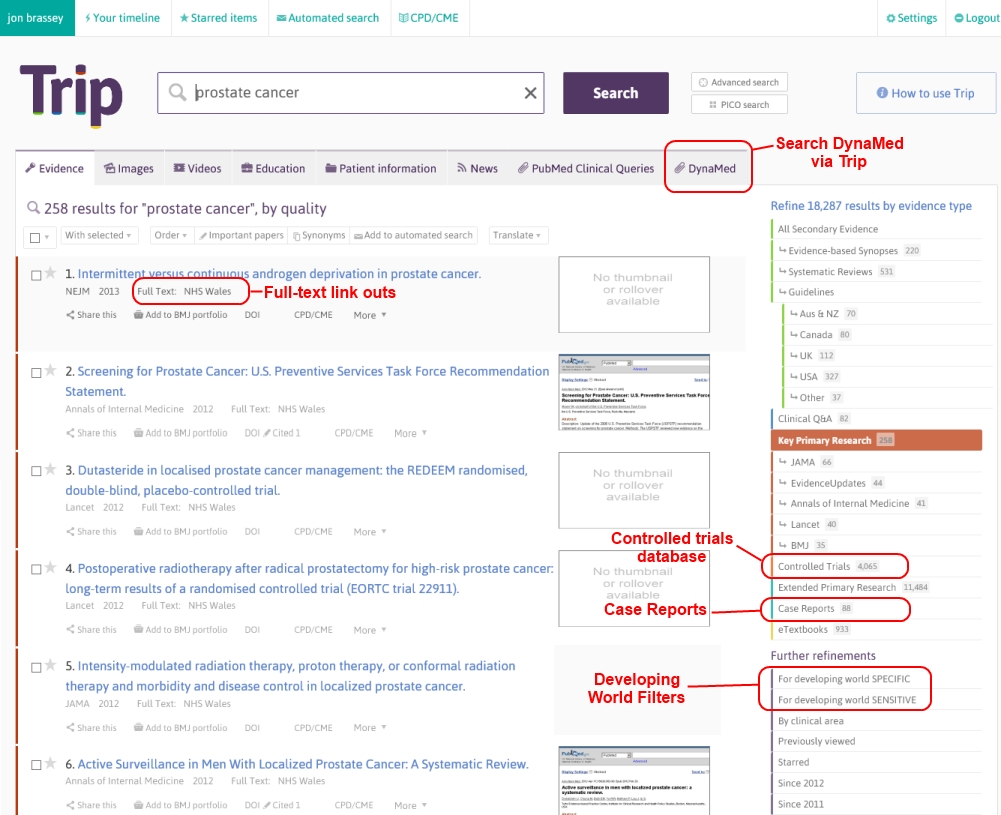
One thing that struck me recently was that we don’t have a filter for RCTs in Trip.  Given the importance of these it seems remiss of us.  So, why not create one?  Well, I now plan to in early 2013.  We can build this by scraping content from PubMed using a suitable RCT filter (the current count is 438,900 trials) and I hope to work with Mendeley to highlight even more.  So, we should have a RCT collection of over 500,000 trials – which is hugely impressive.

While I was working through this idea I saw an email about the lack of systematic reviews suitable for the developing world (low and middle income countries, or LMIC).  As you may know we have done some work in this area (see our crowdsourcing initiative) but that’s never really taken off. 

So, a thought occurred, why not use a filter for LMIC content?  A filter is a series of terms designed to highlight focussed content.  We’ll use one for identifying RCTs (see here for further details) and it looks for terms/phrases such as randomised in the title.  There are a number of validated filters for RCTs, which is great.  A link from the Norwegian Satellite of the Cochrane Effective Practice and Organisation of Care Group highlights a LMIC filter.  It’s unvalidated but looks like a great start.

So, pulling these two tales together:

  • We create a wonderful RCT database
  • We can tag RCTs if they’re suitable for LMIC
  • We can tag the rest of the Trip content as being suitable for LMIC

This is massive!

Freemium Trip

In March I addressed this issue (see here) but I still keep coming back to the notion of having a freemium version of Trip.  As Wikipedia defines it:

“Freemium is a business model by which a product or service (typically a digital offering such as software, media, games or web services) is provided free of charge, but a premium is charged for advanced features, functionality, or virtual goods.”

Freemium has many advantages, namely security (if people sign up) and of keeping the site – mainly – free. But what would it look like?

I’m currently working on a few benefits to people signing-up:

  • Discounts of various ‘evidence-based’ products (events, courses etc).
  • I’m talking with a book publisher about getting pretty reasonable discounts on their books.
  • Removal of adverts, so a subscriber would not have to see them.

While these are pretty decent, I’m not sure we’ve reached the stage where membership might be compelling!  Anyone got any other ideas?

Also, pricing would need considering.  I was thinking of £2 per month, which is relatively low (in richer parts of the globe). 

The fact that I’ve revisited the topic after 6 months shows two things:

  1. It’s still a model I’m interested in.
  2. It’s not clear-cut, otherwise I would have done it by now!

Tagging articles as answers

This week I did a couple of training sessions in London on using Trip.  It’s great doing these as you really connect with the user, they highlight problems that need fixing and also throw in some ideas.  One person mentioned something that immediately struck me as being useful and fitted with a broad, but vague, theme I’ve been thinking about for years. One of the librarians asked if she could indicate, in Trip, if a document helped answer a question.

In other words, she went to Trip with a Q, for instance, “Is vitamin D2 better than vitamin D3 in vitamin D deficiency?”. She might search and find that a document answers the Q. She would then indicate to Trip that that particular document answered the Q she had.

It’s a simple concept but operationalising it is more complex (more below) but also – fundamentally – would it be widely used?  Clearly, if we create an engaging, easy to use system, it’s more likely to be used..!

Below are some thoughts on the topic, which I hope will resonate with people.  The process might look something like this:

  • A user comes to Trip and they use the site as normal (but logged in).
  • At some stage we ‘highlight’ the tagging feature.  Something like ‘if Trip has helped you answer a Q, let us know and share’.
  • If they activate this we show them their session history (? use the timeline) and they indicate (via tickboxes) which articles they used (as often a Q will require multiple articles to answer it) and then tag all these with ‘These answered my question on X’.
  • We could probably allow users to write a bit of text, to pull it together, give a bottom line etc.  This might well mean we need to allow comments, so people can respond.

The next issue is what to do with this?  A further few thoughts:

  • Activity is recorded in their timeline.  So, a user does a Q&A this is highlighted in their timeline.
  • This collection has it’s own separate page.  So, a user can point to each eg tripdatabase.com/qa/vitd2ord3
  • Each user has their own Q&A page, which lists all the answers they’ve done.
  • How do we index/use this?  Do we add it to Trip answers and this is then searchable? This seems reasonable – but a slight worry about potential bias but that can be mitigated by warning text.
  • On each individual result (for an article in Trip, not a Q&A) we indicate, somehow, that it has been used to answer a question.  In other words a user searches Trip normally and in the results it’s highlighted if a user has ‘tagged’ the article to say it has been useful.

Right, lots of thoughts above – highlighting the issues I’m wrestling with.  It also gives a glimpse of how I work.  This is an early stage idea which needs conversations between me and users (and our techie and designer). 

After this stage – and with your help – I’ll try and get our designer to mock this up so we can better explain the concept and make it more tangible.  How long that takes is another issue!

Starring articles on Trip

The timeline on Trip captures all your activity on the site, recording your search terms and articles viewed.  An extension of this is the ‘star’ feature.  This allows you to highlight articles that you think are particularly ‘notable’.  To ‘star’ an article you simply press the star to the left of a particular result (remember you should be logged in).

At any stage you can look back at your starred articles via a link at the top of the page called ‘Starred items’. 

You can also restrict any search you carry out to only show items you’ve starred.  You do this via the ‘Further refinements’ section on the right-hand side of the results page (for interest, there is also the ability to restrict search results to those you’ve previously looked at).

I’ve also created a screencast for further information – click here to view.

Using Trip for educational purposes

Using Trip can be highly educational – searching, reading articles, reflecting etc.

Many professionals (doctors, nurses etc.) can be required to keep a record of their educational activity throughout the year, to demonstrate that they are keeping ‘up to date’ with the latest research.

Trip has two main ways of supporting this:

  • The timeline – this is a record of activity on Trip (search terms, articles viewed), this can easily be exported as a PDF for inclusion in any portfolio of learning.
  • Reflective learning – more in-depth than the timeline the reflective learning tool allows clinicians to easily record any reflections they have while reading an article.  This is accessed via the CPD/CME button under each result.  Again, all CPD/CME activity is easily exported as a PDF file.

To help understand how to use Trip and the different types of support we offer we’ve produced a brief screencast, which can be viewed here.

How the PICO search works

So far the PICO search has been one of the most heavily praised features on the new Trip.  But, we received the following comment:

I noticed my search was translated as follows: 8 results for “(title:ischaemic stroke)(title:CT perfusion scan)(non CT perfusion)”, by relevance

Does this mean that TRIP searches for search terms entered in the PICO search interface only in the titles of articles? 

If so, I would not feel confident that I had not missed out on other pertinent papers….

This is a really important point, how does PICO search work?

At the heart of the PICO search is something called contingency searching.  With the normal Trip search you get all the results that match your search terms but with the PICO search we aim to just show a limited number of highly focused results.  To achieve this our first search is for all the PICO elements as title only searches.  If there are too few results we then make the final search term a ‘title and text’ search and repeat the search and if that too has too few results we make the penultimate term a ‘title and text’ and we repeat that until we get a manageable number of results.  All these repeated searches are done in the background; from a user’s perspective it’s a single search. 

So, in response to the last point raised by the user, it’s not an exhaustive search and should not really be used for a timely ‘gather all’ search. It’s designed to help users, who are in a rush, get a really manageable set of results to help answer their clinical query.  It does that rather well.

A ‘screengrab’ showing the PICO search is below (click to make larger). We’ve also made a screencast to demonstrate PICO in action – click here to view that.

It’s here

At the end of the summer 2011 we asked users about how they used Trip, what they liked, what they didn’t like and how they would like Trip to develop.  The main set of results can be seen here.  These results, combined with my own views, independent feedback from users and the contents of the wonderful book Search User Interfaces spurred Trip on with the latest redesign.

Add in the following elements:

  • The ever wonderful Phil, our main developer. Superlatives fail to describe his wonderful work on the site (Click here to see his LinkedIn profile)
  • Reuben, (introduced to us by Phil), his work has been so exciting and it’s been great having a fresh pair of eyes on the site/problems we face.
  • An fair amount of investment, both financial and time from the Trip team (myself and Chris)
  • Those that donated to Trip earlier on this yeat
  • The beta-testers – thank you for your work.

I’ve described the main updates in this blog post but the only real way to appreciate the site and the breadth of changes is to go and use it – go now!

Another way is to watch this brief screencast I’ve produced (which can be viewed in a larger format here).

http://www.screenr.com/embed/mCj8

Ratings and comments on Trip

One thing I learnt while studying the diffusion of innovations and social networks was that the greater the uncertainty the more likely we are to turn to people for advice/reassurance.

Two recent personal experiences highlight this phenomenon. Firstly, I was looking for places to go on holiday. There were a number of companies offering the type of holiday I wanted (sailing/activity) and from multiple locations. All were broadly similar in cost, had similar weather and facilities. So, to help me decide I took to TripAdvisor and located all the potential targets and chose by looking at user ratings and comments.

The second experience relates to me buying a new camera (which broke while on my holiday) I wanted a particular type of camera and to help me decide I went to Amazon and again looked at user ratings and feedback. In the end the newest version of the camera I wanted had pretty poor reviews, so for now, I’ve decided not to buy a replacement and to simply rely on my relatively good mobile phone camera.

I’ve been reflecting on this theme as recently, two separate users of Trip have floated the idea of introducing such a feature in Trip. I posted the idea on our Facebook page over the weekend and idea was received quite positively (based on a small number of responses).

I like the idea as it can help give context to the research, give different perspectives and perhaps help highlight potential problems with the evidence. There are associated problems such as potential bias, inaccurate comments etc. But I’m sure these negatives can be mitigated for, with some thought.

So, what might a rating/comments feature look like? I have my ideas, which I’ll highlight below but I’m really keen to obtain feedback from you. This feature, if it is to be released, will not happen till next year – but it’s useful for me to reflect on ideas.

One thing that is essential is that the system is easy to use and understand. I would like it to be more than a binary ‘good or bad’ or ‘thumbs up or down’. On both TripAdvisor and Amazon I like to look at reviews by score. So, for those who gave a holiday/product a low score, why was that and vice versa for high scores? So, I think it requires a numerical scale and both TripAdvisor and Amazon use a 1-5 scale (although, someone pointed out that people tend to gravitate to the middle).

When people have scored an article we should offer them the ability to comment. We could suggest a structure to comment against (e.g. what did you like about the article, what did you dislike etc) but I think the more formalised you make it the less it’ll be used. So, I favour a free-text response.

The results would need to be displayed somehow but I’ll not give that much thought now, I think our designer would be the best to advice on this. Needless to say it needs to be clear and easy to understand. I also like the idea of being able to sort results by rating (currently, on Trip, you can sort results by relevance and date).

There are still questions to be explored (apart from the big one of do people think it’s a good idea), such as:

  • Will it be used? I’ll explore this further with our users over the next few months (after we release the new version of the site – due imminently).
  • What will the score represent? I think one can over-analyse. But, I think it indicates a user’s view/opinion on a paper and what this represents is individual to the person. With TripAdvisor and Amazon the comments help explain their rating and you take the points that you feel (as a consumer of the ratings) are important to you.
  • Do we ‘seed’ the scores? We could create a starting score for each document to get the ‘ball rolling’. We could create a score based on the quality of the publication and how often it has been viewed. As people submit ‘real’ ratings the seed-score diminishes in worth.

I often get excited by new ideas and this is no exception. If ratings/comments take off I think it will impact how users consume evidence. It’ll also deliver something that is hugely beneficial, yet potentially immeasurable – value!

Finally, now you’ve read this, please do our two question survey – click here.

Nearly there

I forget how horrible it is, testing the site.  There is the worry about how users will take to it (few people like change), will people like the new features,etc.  Oh yes, the hard work and worry that you’ve missed something!

I’m reassured that the core of Trip – our content and search system are broadly untouched – so users will still get the same results.  The new design, a number will not like but after a few searches I have no doubt that these will be forgotten. 

I’ve previously blogged about the changes (click here) but there is an additional change which you might find interesting – results thumbnails.  I’ve even done a screencast to show how it works (click here) which gives a sneak preview of the new site.

I’m hoping it’ll all be finished and launched by mid-October (so two weeks). The ‘to do’ list of fixes is currently at around 35 and a major headache that it looks awful in Internet Explorer 7 (an old browser, but heavily used in the UK’s National Health Service).

If you want to help test the site then email me – jon.brassey@tripdatabase.com

Blog at WordPress.com.

Up ↑