I’d not noticed the cited by N systematic reviews before in PubMed:
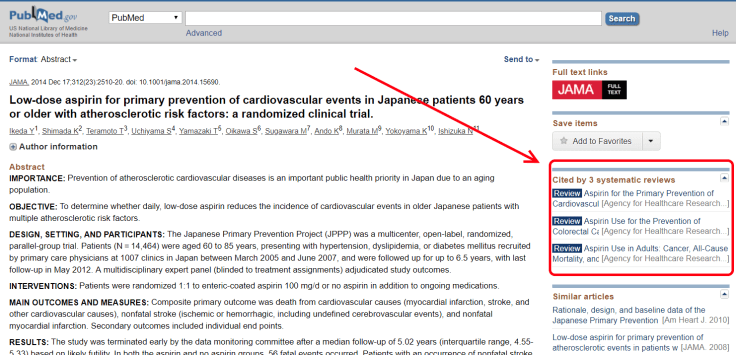
I’m thinking that might be useful!
I’d not noticed the cited by N systematic reviews before in PubMed:
I’m thinking that might be useful!
A further list of automated reviews for you to browse:
As well as improvements to our automated review system we’re planning more improvements to the site and it’ll focus on getting back to our roots – clinical Q&A. Trip was born out of a need to help support a formal, manual, clinical question answering service (called ATTRACT) and is still the main reason people use Trip.
We’re looking to build on lots of separate features we already have in Trip:
But we hope to bring a number of other techniques ranging from machine learning to community support.
We can’t wait…
A long standing issue with our automated review system (and see these examples for acne and migraine) is trying to understand where it fits in the evidence ‘arena’. In other words how do we position it so people understand what it is and how they might benefit from it.
To help us we’ve asked a number of colleagues about the system and how they might use it. Three bits of feedback, both from doctors, encapsulate the thinking:
Doctor One
A super fast (but not exhaustive nor systematic) screening tool to search for useful (or not useful) therapies.
e.g. If I have a patient with X disorder and I am familiar with 1 or 2 therapies yet the patient is not responding and is willing to try other alternatives. This seems like a much quicker way of getting potentially useful alternatives (and afterwards begin a more detailed search based on suggested trials) than reading pages and pages of pubmed results.
Doctor Two
For me, as a GP, I wouldn’t trust the results of this to decide on what to do. But that’s probably not the point (and I’d go to a guideline or systematic review anyway). The system is great for exploring of evidence, being able to visualise the evidence-space. I think the title ‘auto-synthesis’ probably doesn’t do the tool any favours, since you’ll just get a load of people saying ‘no it’s not…’ (not that being controversial is necessarily a bad thing!) If you do a pubmed search for something you’ll get 100s results, and it’s totally unmanageable. Here you have a system which presents a single visualisation, which prioritises RCTs and SRs (so up the pyramid), and makes some assessment of quality (to help prioritise), and auto does the PICO bit. All very cool, very useful, and impactful, but just maybe a tweak to the marketing/usage message.
Doctor Three
Personally I’ve found it clinically useful lately in a couple of ways…
1) A good short-cut to see what treatments have been studied for a condition
2) Related to #1, I suppose, I ‘ve also found it a quick way to find if a PARTICULAR intervention has been studied.- eg, for a patient with delirium, I was wondering whether melatonin had been studied for hospitalized elderly patients, so after searching on delirium and melatonin, (https://www.tripdatabase.com/autosynthesis?criteria=delirium&lang=en), I was able to search further by expanding the Melatonin bubble. I find it particularly useful to be able to expand the bubbles, then link directly to pub med article entries.
So, all say roughly the same thing – it’s an evidence exploration tool. Imagine if you searched for ‘acne’ on Trip, Medline, Google etc. It gives you search results but no sense of the evidence base in that area.
So, to us, it seems like an evidence exploration tool but is it actually an evidence map? We did played with the idea of Trip Overviews of Evidence (TOE) but we’re not sure! But we’ve had various suggestions – please help us pick:
One other suggestion, which is so good, but the acronym is less good: Automated Review and Synthesis of Evidence
If you’ve anything else to add then either email me (jon.brassey@tripdatabase.com) directly or leave a comment below.
This was a sobering exercise.
As part of the update of Trip I came across this article Efficacy of 8 Different Drug Treatments for Patients With Trigeminal Neuralgia: A Network Meta-analysis. So, I excitedly went to see how good our automated review system did for trigeminal neuralgia. On an initial examination, of the 8 interventions we did well in just one – so, 1 out of 8 – that’s a fail in anyone’s book. However, it’s not as it first seems….
Lidocaine – we gave it an overall score of 0.01 (indicating a pretty neutral score). This was based on three very small studies. As such we discount really small studies due to their inherent unreliability. The network meta-analysis (NMA) also referenced three studies (but not the same three!):
Of which our system only incorporated the top one. We included two others:
What confuses me is that the two references we didn’t find – from the network meta-analysis (NMA) – are not specifically about trigeminal neuralgia. So, I’m thinking our result is potentially better than theirs!! I’ve emailed the author for clarification!
Botulinum toxin type A – we scored it as 0.45 (maximum score is 1) so it fits with their analysis.
Carbamazepine – A big failure on our part, we scored it -0.03. We included two studies of carbamazepine, neither of which belonged there. So, we should have reported no trials. It should not have even featured in our results.
Tizanidine – We scored it -0.03 with our system found a single trial A clinical and experimental investigation of the effects of tizanidine in trigeminal neuralgia which was very small and reported “The limited efficacy of TZD“. It scores near zero as, due to the size, we consider it unreliable and therefore discount the score.
The actual NMA referenced one other study Tizanidine in the management of trigeminal neuralgia. This is not in the Trip index (failure of our RCT system as it is included in PubMed). And that paper reported “The results indicate that tizanidine was well tolerated, but the effects, if any, were inferior to those of carbamazepine.” so hardly a glowing indictment of the efficacy of tizanidine!
I actually think our assessment is reasonable and it seems a stretch of the paper to report it as being superior to placebo (even if they don’t claim statistical significance).
Lamotrigine – we found no trials. Trip includes one of the trials the NMA included Lamotrigine (lamictal) in refractory trigeminal neuralgia: results from a double-blind placebo controlled crossover trial but for some reason it wasn’t tagged properly. Something to investigate
Oxcarbazepine – we found no trials and Trip includes no trials, so our system didn’t fail it was due to the fact Trip doesn’t contain all published clinical trials.
Pimozide – we found no trials. Trip includes one of the trials Pimozide therapy for trigeminal neuralgia but for some reason it wasn’t tagged properly. Something to investigate.
Proparacaine – We scored it -0.07 and the NMA reported it as no better than placebo. In hindsight I think this is what our system found. The system compares interventions with placebo. So towards 1 = better than placebo, -1 = worse than placebo and 0 = similar to placebo.
So, having gone through each entry I actually think our system did better than before.
Correct
Uncertain, I think our system did better than the paper (on the evidence I’ve seen)
Wrong, due to finding no trials with no trials in Trip and not reporting the intervention (so not too bad as we didn’t make any claim on efficacy)
Wrong, due to finding no trials but missing trials in Trip and not reporting the intervention (so not too bad as we didn’t make any claim on efficacy)
Failure, due to us falsely including two trials and making a ‘claim’ for it’s efficacy. It should not have featured at all!
Conclusion: When I first looked I was fairly depressed by the results. However, now I’ve understood them I’m actually quite pleased. Of the eight interventions in the NMA we only clearly got one wrong (Carbamazepine) where we wrongly assigned a score. We omitted giving a score for three (but we should have for two of those Lamotrigine and Pimozide) however, as that does not create any prediction by our system I’m fairly relaxed about it – but will still investigate why. There are still two unclear results (Lidocaine and Tizanidine) where I actually think our results are better – but will wait to see what the authors report back.
Interestingly the CKS guidance on trigeminal neuralgia (sorry only available in the UK) suggests using carbamazepine as the first line, before stating:
“If carbamazepine is contraindicated, ineffective, or not tolerated, seek specialist advice. Do not offer any other drug treatment unless advised to do so by a specialist.”
This indicates a lack of faith in any other intervention! CKS reference the NICE guidance on Neuropathic pain in adults which has a section “2.3 Carbamazepine for treating trigeminal neuralgia” which reports:
“Carbamazepine has been the standard treatment for trigeminal neuralgia since the 1960s. Despite the lack of trial evidence, it is perceived by clinicians to be efficacious. Further research should be conducted as described in the table below.”
So, it’s not surprising there are no trials but the recommendation itself seems to lack an evidence base.
Bottom line: Initial a ‘fail’ but actually a ‘reasonable pass’
A reminder, the automated review system is a proof of concept. Using the example of obesity I’d like to point out problems and explain why they are happening. In part this to acknowledge them but more importantly to give a further insight in to how the system works!
Two evidence blobs stood out, to me, antibiotics and probiotics:
Antibiotics: The positive, low risk of bias, RCT was “Efficacy of prophylactic antibiotic administration for breast cancer surgery in overweight or obese patients: a randomized controlled trial“. So, our system has mis-classified this by not picking up the breast cancer. It’s a similar issue with the two other trials included, both are about surgery in obese patients.
I’m going to see if we can exclude trials where two ‘populations’ (breast cancer and obesity) are mentioned for a given trial. Although I wonder if that causes more problems than it solves!
Probiotics: There was a recent systematic review “Effects of probiotics on body weight, body mass index, fat mass and fat percentage in subjects with overweight or obesity: a systematic review and meta-analysis of randomized controlled trials“, it concludes:
“Administration of probiotics resulted in a significantly larger reduction in body weight (weighted mean difference [95% confidence interval]; -0.60 [-1.19, -0.01] kg, I2 = 49%), BMI (-0.27 [-0.45, -0.08] kg m-2 , I2 = 57%) and fat percentage (-0.60 [-1.20, -0.01] %, I2 = 19%), compared with placebo; however, the effect sizes were small. The effect of probiotics on fat mass was non-significant (-0.42 [-1.08, 0.23] kg, I2 = 84%).”
So, it’s a positive review – albeit it with small effect size. Our system cannot distinguish large or small effect sizes – simply positivity or negativity. Hence it appears as one of the better interventions!
I’m not sure how to overcome that one…!
As we find issues with our automated review system we’ll post them here. Keep them coming, we need the feedback!
Our evidence mapping system is experimental/proof of concept and should be treated with scepticism. And, to be clear, this is a fully-automated system that relies on techniques such as machine learning and natural language processing (NLP). There are a list of known issues – please read!
At the simplest level the system aggregates interventions that explore the same condition and intervention – be it randomised controlled trials or systematic reviews. These are then ‘mapped’ to give a visual representation of the interventions used for a given intervention with an indication of the potential effectiveness.
The evidence for each intervention is displayed in a single evidence ‘blob’. The system assesses:
It uses these to arrive at an estimate of effectiveness (visualised by relative position along the y-axis). Bias is demonstrated by the shade of the evidence ‘blob’.
Now, for the more complex explanation.
Identifying the condition and intervention: We use a mixture of NLP and machine learning to try to extract the condition and intervention elements for all the RCTs and SRs within Trip. At this stage we only use trials with no active comparison – so we only use trials/reviews that are against things like placebo and usual care.
Effectiveness: We use sentiment analysis to decide if the intervention is positive (favours the intervention) or negative (shows no benefit over placebo or usual care).
Sample size: Using a rules based system we identify the sample size of RCTs.
Bias: For RCTs we use RobotReviewer to assess for bias. Trials are categorised as ‘low risk of bias’ or ‘high/unknown risk of bias’. For SRs we have been pragmatic and cautious. We have counted Cochrane reviews as low risk of bias and all the rest as high/unknown.
Creating the overall score: For each trial or review we start with the score of either 1 or -1 (positive or negative). We then adjust using the sample size and bias score.
So, a large, positive, trial with low risk of bias will score 1 while a very small, positive, trial with a high/unknown bias will score very little (not much more than zero).
We then combine the separate scores, depending on what trials/reviews we find:
Understanding the visualisation
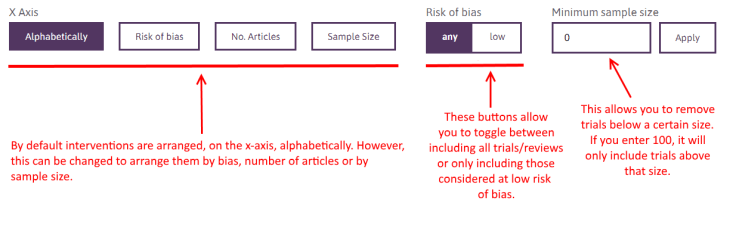
The size of each blob represents the sample size. The larger the blob, the bigger the combined sample size.
The colour of the blob represents how biased the content is. By that we mean the proportion deemed at low risk of bias and the proportion at high/unknown risk of bias. Light green is the lowest risk of bias.
Second level visualisation
If you click on an individual blob it reveals a detailed breakdown of the constituent parts of each blob, showing the individual trials/reviews:
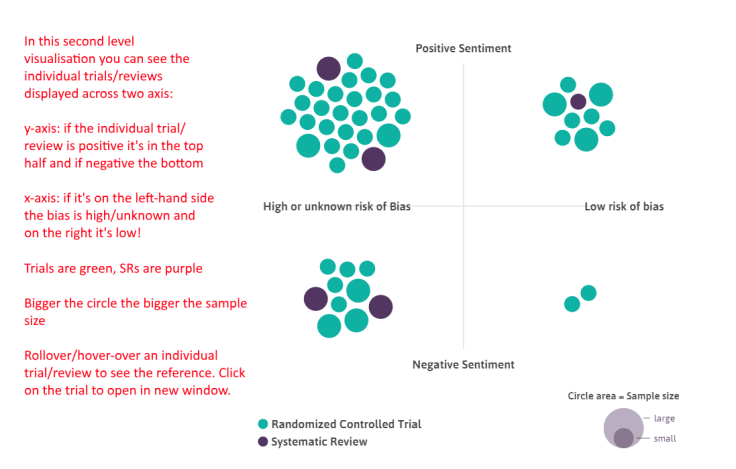
Reminder: even though it shows all the data we find we don’t necessarily use all of it in the scoring of each intervention. See ‘Creating the overall score’ above.
Next stage
To us, this is a proof of concept, and we feel the wider ‘evidence community’ can help guide developments. However, quality is key so we want to improve the data. Each of the automated steps is not 100% accurate (although fairly close) So, we see two immediate needs:
It’s taken longer than we had hoped but it’s all ready to go! It’s been through a small-scale beta testing round and improvements made. It should be live before the end of the weekend.
As part of the testing we’ve received feedback on how people might use the, the cautions, possible comms issues etc. As such we’re going to released as a ‘proof of concept’. This is to help convey the experimental nature of the approach.
Needless to say we’ll let you know when it’s actually live!
 | User feedback on the… on User feedback on the AskTrip A… |
 | Stephen Edwards on User feedback on the AskTrip A… |
 | Ms GL on User feedback on the AskTrip A… |
 | kavyapharmaindia on Finding Evidence or Watching I… |
 | raspberryspeedily3c9… on User feedback on the AskTrip A… |


Recent Comments